Authenticate your emails with SPF, DKIM, and DMARC to build trust with inbox providers.
Protect your sender reputation by maintaining consistent sending patterns and monitoring domain health.
Remove inactive subscribers and focus on engaged contacts to improve inbox placement.
Avoid sudden spikes in send volume; warm up domains and scale gradually.
Write honest, non-clickbait subject lines that match email content.
Improve engagement with personalization, clear CTAs, and behavior-based messaging.
Make unsubscribing easy and comply with one-click unsubscribe requirements.
Maintain strong list hygiene by removing hard bounces and avoiding purchased lists.
Balance text and images, avoid broken HTML, and keep email size optimized.
Use an advanced email automation platform to manage segmentation, monitor deliverability, and prevent spam triggers.
There comes a time in every email marketer’s career when a perfectly crafted campaign ends up in the spam folder. You might have seen this happen more often in 2026 because email service providers have become stricter.
Approximately 188 billion spam emails are sent per day, accounting for nearly 48% of all email traffic. To protect the user experience, providers like Gmail, Yahoo, Apple, and Outlook have implemented aggressive machine-learning filters that go far beyond simple keyword checks. This means, unfortunately, sometimes your emails might end up in spam.
But it’s not all bad news.
If you’re scratching your head, wondering how to reduce the email spam rate in 2026, we’ve got you covered! This guide will highlight some best practices to increase your odds.
9 Reasons Your Email Campaign Ends Up in Spam (And How to Fix It)
1. Poor Sender Reputation
Your sender reputation is a score assigned by Internet Service Providers (ISPs). It works much like a credit score. If you have a history of sending high-quality content that people want to read, your score remains high. If you send unwanted mail, your score drops.
Why it happens:
ISPs track your IP address and your sending domain. If you send emails from a cold IP address or a domain that has been flagged for suspicious activity, providers will automatically route your mail to spam. Reputation issues often stem from using shared IP addresses where other senders are behaving poorly, or from your own inconsistent sending habits.
How to fix it:
Check your sender score regularly using public tools to see how ISPs perceive your domain.
Use a dedicated IP address if you send more than 50,000 emails per month to isolate your reputation from other senders.
Monitor your postmaster tools provided by Google and Microsoft to see direct feedback on your domain health.
Focus on consistent sending volumes rather than massive, infrequent blasts.
Ensure your domain has been active and warmed up for at least 30 days before sending high-volume campaigns.
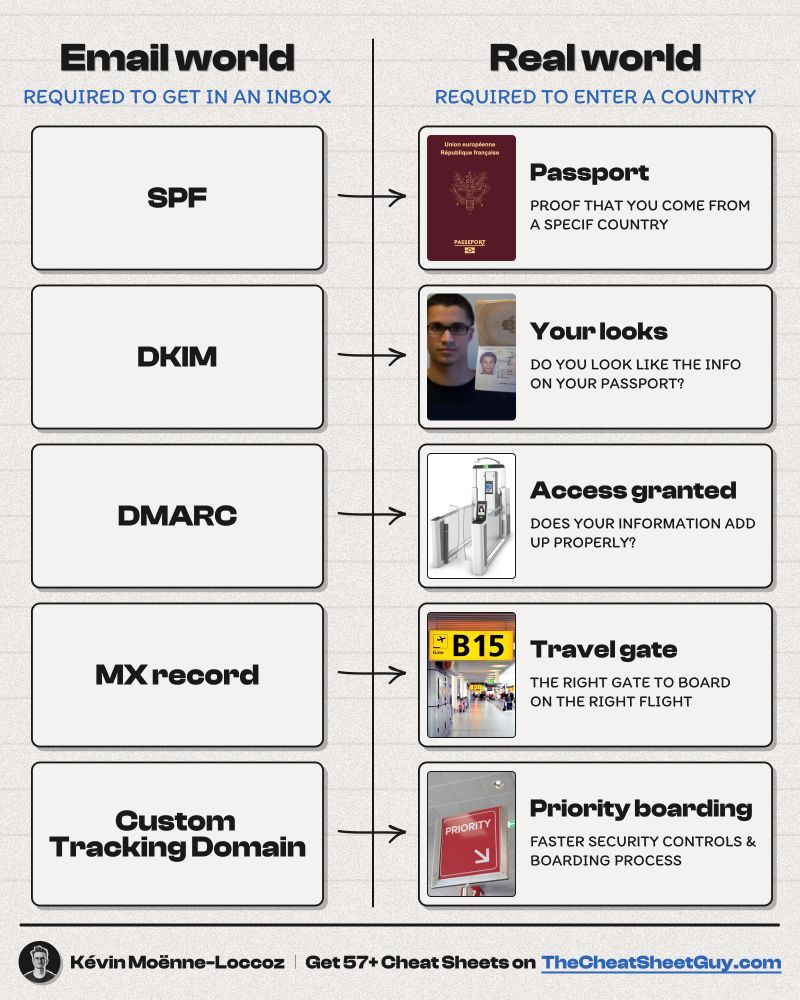
Technical authentication is the digital ID card for your email. Without it, an ISP has no way of verifying that the email actually came from you and not a malicious actor pretending to be your brand.
Why it happens:
Since early 2024, Google and Yahoo have mandated strict authentication for bulk senders.
In 2026, these requirements are even more rigid. If your DNS settings are missing SPF, DKIM, or DMARC records, inbox providers view your emails as a security risk. This is one of the most common reasons for immediate blocks.
Industry data suggests that nearly 30% of small business domains still lack full DMARC implementation, leading to unnecessary delivery failures.
How to fix it:
SPF (Sender Policy Framework): Update your DNS records to list all the IP addresses and services authorized to send email on your behalf.
DKIM (DomainKeys Identified Mail): Implement a digital signature that attaches to your email header, proving the content was not tampered with during transit.
DMARC (Domain-based Message Authentication, Reporting, and Conformance): Set up a DMARC policy to tell ISPs what to do if an email fails SPF or DKIM checks.
Once you confirm your email authentication is working correctly, enable stronger protection settings to block fraudulent emails from impersonating your domain.
3. Sending to Unengaged Contacts
Sending emails to people who never open them is one of the common reasons your email ends up in the spam folder. In 2026, engagement-based filtering is the primary way ISPs decide where to place your mail.
Why it happens:
If a large percentage of your audience ignores your emails for weeks or months, the ISP assumes your content is irrelevant or unwanted. They will begin to filter your emails for everyone, including those who actually want to see them, because the overall engagement signals are weak.
How to fix it:
Create a sunset policy to automatically remove subscribers who haven't opened an email in 90 days.
Run a re-engagement campaign for inactive users, offering a special discount or asking if they still want to hear from you.
Segment your list based on activity levels. Send your most frequent updates only to your most active users.
Prioritize quality over list size. A smaller, highly engaged list is far more valuable than a massive, silent one.
4. Sudden Spikes in Email Volume
Predictability is important to maintaining a good relationship with inbox providers. Sudden changes in sender behavior look like a compromised account or a spam bot.
Why it happens:
If you usually send 5,000 emails a week and suddenly jump to 100,000 in a single day, ISPs will flag this as suspicious. This often happens during holiday sales or when a business moves to a new platform. The automated filters see the spike and place a temporary hold or a permanent block on your domain. ISPs prefer a steady, predictable flow of data.
How to fix it:
Warm up new IP addresses or domains by slowly increasing your volume over several weeks.
Plan your major campaigns in advance so you can gradually scale up your daily limits.
Distribute large campaigns over a period of hours or days rather than hitting send on the entire list at once.
Keep a consistent schedule so ISPs recognize your sending patterns as normal business operations.
5. Misleading Subject Lines
If your subject line promises something the email does not deliver, you are training your customers to report you as spam.
Why it happens:
Using "Re:" or "Fwd:" in a marketing email to trick people into opening it is a major red flag for modern filters.
Similarly, using all caps, excessive exclamation points, or clickbaity phrases like "YOU WON" triggers automated spam filters.
Even if the email gets opened, the high rate of immediate deletions tells the ISP that the content was misleading.
In 2026, AI-driven filters can actually read the context of your subject line and compare it to the body content for consistency.
How to fix it:
Keep subject lines honest and descriptive of the content inside.
Avoid spammy trigger words such as "urgent," "cash," "free," or "act now" when used in a sensationalist way.
Use A/B testing to see which honest subject lines perform best without resorting to gimmicks.
Ensure your "From" name is clearly recognizable as your brand so users know who is contacting them.
6. Low Engagement Rates
Engagement rate has become more than just opens in recent times. It includes clicks, replies, and moving emails to specific folders.
Why it happens:
When users delete your email without opening it, or move it from the Promotions tab to the Trash, it sends a negative signal.
Low click-through rates (CTR) suggest that even if people open the mail, the content is not valuable.
An average healthy CTR for marketing emails in 2026 hovers around 2% to 5%, depending on the industry. Falling below this can signal to ISPs that your content is low-value.
How to fix it:
Include clear, easy-to-find call-to-action (CTA) buttons to encourage clicks.
Personalize your content using data points beyond just the recipient's first name. Use purchase history or browsing behavior.
Ask questions that encourage users to reply to your emails, as a direct reply is one of the strongest positive signals you can receive.
Optimize your preview text to give readers a reason to click through.
7. Spam Complaints and Easy Unsubscribe Issues
A spam complaint is the most damaging metric for your deliverability. If more than 0.1% of your recipients mark your email as spam (1 in 1,000), you will face delivery issues. Google and Yahoo now strictly enforce a 0.3% maximum threshold before permanent domain throttling occurs.
Why it happens:
People often mark emails as spam simply because they cannot find the unsubscribe link.
If the process to leave your list is difficult, users will take the path of least resistance: the "Mark as Spam" button.
Additionally, the 2026 standards require a one-click unsubscribe header in the email code, allowing users to opt out via the ISP interface itself.
How to fix it:
Make your unsubscribe link large, clear, and easy to find at either the top or bottom of the email.
Implement the List-Unsubscribe header in your email technical settings.
Process all unsubscribe requests immediately. A user who asks to leave and receives another email the next day is guaranteed to file a complaint.
Consider a "Manage Preferences" page where users can choose to receive fewer emails rather than unsubscribing entirely.
8. Poor List Hygiene
A clean list is essential for high deliverability. A dirty list contains old, inactive, or fake email addresses that bounce.
Why it happens:
Hard bounces (when an email address does not exist) are a signal to ISPs that you are using an old list or a purchased one. High bounce rates suggest you are not practicing proper list maintenance. Furthermore, spam traps (email addresses used by ISPs to catch bad senders) often end up on unmaintained lists. Hitting even one spam trap can blacklist your domain instantly.
Healthy vs. Unhealthy List Indicators
Metric
Campaign
Warning Sign
Hard Bounce Rate
Under 0.5%
Over 2%
Spam Complaint Rate
Under 0.05%
Over 0.1%
Open Rate
25% - 40%
Under 15%
Unsubscribe Rate
Under 0.2%
Over 0.5%
How to fix it:
Use a double opt-in process where users must click a link in a confirmation email to join your list.
Use an email verification service to scrub your list of fake or malformed addresses every six months.
Remove hard bounces immediately. Most modern email tools do this automatically, but you should verify the setting is active.
Never, under any circumstances, purchase an email list. These are filled with spam traps and inactive accounts.
9. Overuse of Images or Broken HTML
How your email is built matters just as much as what it says. Large files and messy code can trigger filters designed to stop malware and phishing.
Why it happens:
Spammers often use a single large image to hide text from filters. As a result, ISPs are suspicious of emails that have a high image-to-text ratio.
Broken HTML tags or links that use URL shorteners can appear suspicious. URL shorteners are frequently used to hide the destination of malicious links, so they are often blocked by default in corporate environments.
How to fix it:
Maintain a healthy balance of roughly 60% text and 40% images.
Always include alt text for your images so the email is readable even if images are blocked.
Link directly to your domain rather than using third-party link shorteners.
Test your emails across multiple devices and email clients to ensure the HTML renders correctly and links are functional.
Keep the total email file size under 100KB to prevent clipping in Gmail.
2026 Email Deliverability Checklist
Use this checklist before every campaign to minimize the risk of landing in the spam folder:
Authentication Check: Are SPF, DKIM, and DMARC records verified and active?
Identity Check: Is the "From" name clearly recognizable as your brand?
Subject Line Check: Is it honest, clear, and free of excessive symbols or caps?
Unsubscribe Check: Is it easy to find, and does it work with one click?
Hygiene Check: Have you removed hard bounces and unengaged users?
Relevance Check: Is the content relevant to the specific segment receiving it?
Technical Check: Are all links working, and is the image-to-text ratio balanced?
Volume Check: Are you sending at a volume consistent with your recent history?
How the Right Email Automation Tool Improves Deliverability
Even a strong email strategy can fail without the right technology behind it. In 2026, email deliverability depends not only on what you send, but also on how consistently, intelligently, and contextually your emails are delivered.
Using an advanced email automation platform helps reduce spam rate risks while maintaining a strong sender reputation and consistent inbox placement.
Why automation matters
Managing campaigns manually increases the risk of:
inconsistent sending patterns
targeting inactive subscribers
sudden volume spikes
missed authentication issues
overlooked deliverability warnings
A modern email automation platform helps prevent these problems before they impact performance.
7 Ways automation tools help keep emails out of spam in 2026
Smart segmentation and engagement filtering: Automatically suppress inactive contacts and prioritize engaged subscribers to improve open rates and strengthen sender reputation.
Behavior-based messaging instead of bulk blasts: Triggered emails based on purchases, browsing activity, or downloads generate higher engagement and improve inbox placement.
Send-time optimization: AI-driven scheduling delivers emails when recipients are most likely to engage, increasing positive interaction signals.
Built-in authentication support: Modern platforms simplify SPF, DKIM, and DMARC configuration while supporting one-click unsubscribe compliance.
Real-time deliverability monitoring: Dashboards alert you to bounce spikes, spam complaints, or reputation dips before they affect performance.
How to Keep Future Emails Out of Spam: A Summary
Consistency is the best defense against spam filters. In 2026, the businesses that succeed in email marketing are those that treat their subscribers' inboxes with respect. This means sending content that provides genuine value, maintaining high technical standards, and being proactive about list hygiene.
Monitoring your data is the only way to stay ahead of deliverability issues. Watch your open rates closely. If you see a sudden drop for one specific provider, such as a dip in Gmail opens while Outlook stays steady, you likely have a domain reputation issue with that specific ISP. Addressing these problems early prevents long-term damage to your brand.
Focus on building a relationship with your audience. When people look forward to your emails, they open them, click on your links, and even move them to their primary inbox. These positive interactions are the strongest signals you can send to an ISP. By following the steps outlined above, you can stop diagnosing spam issues and start focusing on the growth of your business.
How can I check if my emails are landing in spam folders?
You can use seed lists, which are groups of test email addresses across different providers such as Gmail and Outlook. By sending campaigns to these addresses, you can monitor whether your emails land in the inbox, promotions tab, or spam folder. Tools like Google Postmaster Tools also provide valuable insights into spam rates and domain reputation, particularly for Gmail traffic.
How can I improve email deliverability rates for my marketing campaigns?
Improving engagement is the most reliable way to increase deliverability. Segment your audience so you send messages only to subscribers who have recently interacted with your brand. Combine this with proper authentication protocols, consistent sending behavior, and regular list cleaning to maintain a strong sender reputation.
Why did my emails suddenly start going to spam after months of good delivery?
A sudden change in sender reputation is usually responsible. This can happen if your sending volume spikes quickly, if a recent campaign generated high spam complaints, or if your list contains spam traps. Reviewing bounce reports, complaint rates, and recent campaign activity can help you pinpoint the exact trigger.
Does the time I send my email affect the spam rate?
The time of day does not directly trigger spam filters, but it does influence engagement. If your emails arrive when your audience is inactive, they may be ignored or bulk deleted later. These behaviors send negative engagement signals to inbox providers. Sending at times when your audience is most active helps improve engagement and supports deliverability.
Should I use a subdomain for marketing emails?
Yes. Many brands use a dedicated subdomain for marketing emails while keeping their main domain for day-to-day business communication. This separation protects the reputation of your primary domain if marketing campaigns encounter deliverability issues, and it allows you to manage authentication and sending practices more effectively.
Desperate times call for desperate Google/Chat GPT searches, right? "Best Shopify apps for sales." "How to increase online sales fast." "AI tools for ecommerce growth."
Been there. Done that. Installed way too many apps. But here's what nobody tells you while you're doom-scrolling through Shopify app reviews at 2 AM—that magical online sales-boosting app you're searching for? It doesn't exist. Because if it did, Jeff Bezos would've bought (or built!) it yesterday, and we (fellow eCommerce store owners) would all be retired in Bali by now. Growing a Shopify store and increasing online sales isn’t easy—we get it. While everyone’s out chasing the next “revolutionary” tool/trend (looking at you, DeepSeek), the real revenue drivers are probably hiding in plain sight—right there inside your customer data. After working with Shopify stores like yours (shoutout to Cybele, who recovered almost 25% of their abandoned carts with WhatsApp automation), we’ve cracked the code on what actually moves the needle. Ready to stop app-hopping and start actually growing your sales by using what you already have? Here are four fixes that will get you there!
The Painful Truth: You're probably losing about 70% of your potential sales to cart abandonment. That's not just a statistic—it's real money walking out of your digital door. And looking for yet another Shopify app for abandoned cart recovery isn't going to fix it if you're not getting the fundamentals right.
The Quick Fix: Everyone knows you need multi-channel recovery that hits the sweet spot between "Hey, did you forget something?" and "PLEASE COME BACK!" But here's the reality—most recovery apps are a one-trick pony. They either do email OR WhatsApp, not both. And don't even get us started on personalizing offers based on cart value—that usually means toggling between three different dashboards while praying your apps talk to each other.
Enter ZEPIC: This is where we come in. With ZEPIC's automated Flows, you can: Launch WhatsApp recovery messages (with 95% open rates!) Set up perfectly timed email sequences (or vice versa) Create personalized recovery offers not just on cart value but based on your customer’s behavior/preferences Track and optimize everything from one dashboard
Fix #2: Reactivate past customers today
The Painful Truth: You're probably losing about 70% of your potential sales to cart abandonment. That's not just a statistic—it's real money walking out of your digital door. And looking for yet another Shopify app for abandoned cart recovery isn't going to fix it if you're not getting the fundamentals right.
The Quick Fix: Everyone knows you need multi-channel recovery that hits the sweet spot between "Hey, did you forget something?" and "PLEASE COME BACK!" But here's the reality—most recovery apps are a one-trick pony. They either do email OR WhatsApp, not both. And don't even get us started on personalizing offers based on cart value—that usually means toggling between three different dashboards while praying your apps talk to each other.
Enter ZEPIC: This is where we come in. With ZEPIC's automated Flows, you can: Launch WhatsApp recovery messages (with 95% open rates!) Set up perfectly timed email sequences (or vice versa) Create personalized recovery offers not just on cart value but based on your customer’s behavior/preferences Track and optimize everything from one dashboard
Offering light at the end of the tunnel is Google’s Privacy Sandbox which seeks to ‘create a thriving web ecosystem that is respectful of users and private by default’. Like the name suggests, your Chrome browser will take the role of a ‘privacy sandbox’ that holds all your data (visits, interests, actions etc) disclosing these to other websites and platforms only with your explicit permission. If not yet, we recommend testing your websites, audience relevance and advertising attribution with Chrome’s trial of the Privacy Sandbox.
Top 3 impacts of the third-party cookie phase-out
Who’s impacted
How
What next
Digital advertising and acquisition teams
Lack of cookie data results in drastic fall in website traffic and conversion rate
Review all cookie-based audience acquisition. Sign up for Chrome’s trial of the Privacy Sandbox
Digital Customer Experience
Customers are not served relevant, personalised experiences: on the web, over social channels and communication media
Multiply efforts to collect first-party customer data. Implement a Customer Data Platform
Security, Privacy and Compliance teams
Increased scrutiny from regulators and questions from customers about data storage and usage
Review current cookie and communication consent management, ensure to align with latest privacy regulations


%201.png)