Omnichannel Retail—Part 2: 6 Strategies to Increase Store Sales with Online Retargeting
Anandhi Moorthy
Senior Content Marketer
December 11, 2025
TLDR
Strategy 1: Local Inventory Ads (LIA): Use Google LIA so high-intent “near me” searchers see real-time local stock, distance, and store info, nudging them to “pick up today” instead of waiting for shipping.
Strategy 2: Retention via Email & WhatsApp: Build an automated retention engine using POS data and RFM segmentation to trigger replenishment nudges, VIP early access campaigns, and high-intent WhatsApp workflows like back-in-stock alerts.
Segmentation & Workflows: Let your automation platform continuously segment customers into groups like Recent High-Spenders, Lapsed Loyals, and One-Time Buyers, then run “set it and forget it” workflows (replenishment, win-back, VIP access) to keep journeys relevant.
Strategy 3: Instagram Automations: Use Comment-to-DM and Story Reply automations to move engaged followers into DMs with lookbooks, coupons, and VIP passes that can be shown in-store for discounts, turning social engagement into measurable foot traffic.
Strategy 4: Run Meta/TikTok store traffic campaigns and “Show this screen to redeem” offers, then track a unique POS promo code (e.g., INSTA25) to directly attribute in-store sales to specific ads.
Strategy 5: Geofencing & Competitor Conquesting: Geofence your own stores to re-engage visitors who didn’t buy and geofence competitors to show “we’re cheaper/closer” WhatsApp messages to shoppers already browsing similar products nearby.
Strategy 6: BORIS (Buy Online, Return In-Store): Turn returns into revenue by incentivizing in-store returns with perks .
The reality of modern retail is that your customers are channel-agnostic. They don’t see "online" and "offline" as separate worlds; they just see your brand. Yet, many retailers still treat their e-commerce sites and physical stores as separate entities. This is a mistake. Research consistently shows that omnichannel campaigns earn a 287% higher purchase rate than single-channel campaigns.
In this guide, we will explore five actionable strategies to use your digital tools, from email automation to local inventory ads, to increase foot traffic, boost in-store sales, and maximize the lifetime value (LTV) of every customer.
Strategy 1: The "Digital Shelf": Local Inventory Ads (LIA)
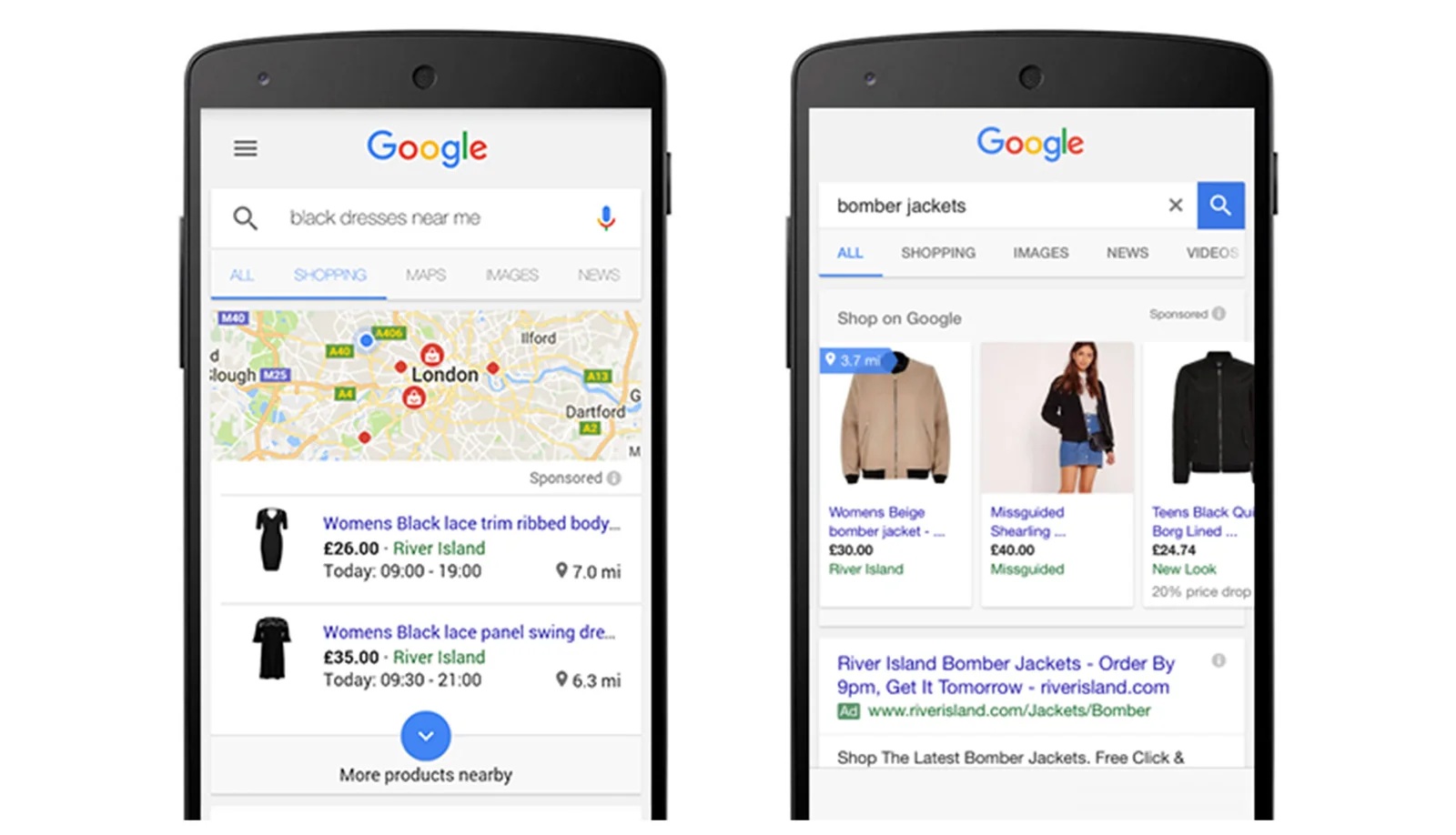
Source: Think with Google
For decades, the biggest advantage of physical retail was immediacy. If you needed a hammer, you went to the hardware store. However, today, that journey starts on a phone.
80% of shoppers engage with a digital touchpoint before they ever set foot in a store. When a customer searches for "running shoes near me" or "organic dog food," they are displaying high commercial intent.
If your digital ads only point them to an e-commerce checkout with a 3-day shipping window, you might lose them to a competitor down the street.
How It Works: Google Local Inventory Ads (LIA)
Google Local Inventory Ads (LIA) is the bridge between search intent and physical availability. Unlike standard shopping ads that drive traffic to a website, LIA shows the customer exactly what is in stock at your nearest branch.
When a user searches for a product, your ad displays:
The product image and price.
The text "In store • 1.2 mins."
Store hours and directions.
Example:
Imagine a customer searches for a specific cordless drill. A standard ad might show the drill for $99 with "Free Shipping." A Local Inventory Ad for a retailer like Home Depot or a regional hardware chain will show "In Stock at Downtown Branch • Pick up today." This psychological trigger of immediacy is often the deciding factor for the purchase.
Implementation Tip:
Success with LIA relies on data hygiene. You must connect your Point of Sale (POS) inventory feed to your Google Merchant Center account. This ensures that if you sell the last unit of a product at 10:00 AM, the ad automatically stops running by 10:15 AM, preventing the frustration of a wasted trip.
Strategy 2: High-Conversion Retention via Email & WhatsApp
In the data collection phase, you get email addresses and phone numbers at checkout. It’s time to use that data to build an automated retention engine.
Effective retention marketing relies on segmentation. You shouldn't send the same generic "Weekly Newsletter" to everyone. Instead, use the purchase data from your POS to trigger relevant workflows.
The Foundation: Segmentation & Workflows
Before sending a message, you must group your customers based on behavior. A common and effective method is RFM Analysis (Recency, Frequency, Monetary value).
To implement this, export your POS data into your marketing automation platform and let the system tag your customers automatically:
"Recent High-Spenders": Customers who purchased in the last 30 days with high average order values (e.g., over $100). These are your VIPs and prime targets for exclusive previews.
"Lapsed Loyals": Customers who haven't visited in 90+ days but were historically frequent buyers. These shoppers need a "win-back" offer to break their inactivity.
"One-Time Buyers": Exclude this group from expensive, high-touch efforts. Focus your budget where the potential return is highest.
Adding the Behavioral Layer: Once you have the basics, layer in behavior. Tag customers based on what they buy (e.g., "Fitness Enthusiasts" who buy protein powder) or where they buy (in-store vs. online). When your messaging aligns with past behavior, such as sending a "Restock for your active routine" email to a health-conscious buyer, conversion rates of these types of campaigns often surge by 15% or more.
The "Set It and Forget It" Rule: Don't do this manually. Automate weekly re-segmentation via API feeds between your POS and CRM. This ensures that if a "Lapsed Loyal" walks in and buys a coffee today, they are instantly moved into the "Active" segment, keeping your messaging relevant and dynamic.
The Workflows
After your segments are defined, you can trigger the specific workflows that drive traffic.
Workflow A: Geofencing Messaging
The Trigger (Online Data): A customer browses for specific items on your website (e.g., a specific brand of running shoes) but does not complete the purchase online.
The Wait (Location Monitoring): The customer leaves your website, and your retargeting system begins monitoring their location via geofencing technology when they are near one of your physical store locations.
The Action (Real-Time WhatsApp message): When the customer enters a predetermined geofence (e.g., within a 1-mile radius of your store), they get a WA message immediately
The Content: "Welcome to the neighborhood! That [Specific Running Shoe Name] you were looking at online is in stock and waiting for you at [Local Store Name]. Get a free pair of premium socks with your in-store purchase."
The Result: You leverage high-intent online interest with physical proximity and a compelling in-store offer, converting an abandoned online cart into a high-value physical store visit and sale.
Workflow B: VIP Early Access (Email)
This workflow targets your "High Monetary" segment, the top 20% of spenders.
The Concept: Drive traffic during slow periods (like Tuesday mornings) by leveraging exclusivity.
The Action: Send an email 48 hours before a major public sale. with a message, "Our Black Friday sale starts online on Friday. But as a VIP, you can shop the sale in-store starting Wednesday."
Why it works: It makes the customer feel special and smooths out your operational peaks by spreading traffic over more days.
The WhatsApp Factor: Urgency & Concierge
While email is excellent for storytelling and visual merchandising, WhatsApp marketing for retail is for action. With open rates hovering near 98%, it is the most direct line to your customer. However, it must be used strategically to avoid being blocked.
Workflow C: Back-in-Stock Alerts
The Scenario: A customer visits your store, but you don't have their size in the specific denim jacket they want.
The Capture: The sales associate tags their profile in the POS with "Waitlist: Denim Jacket Size M."
The Automation: When inventory arrives at that specific location, a WhatsApp message fires automatically. Message: "Hi Sarah, the jacket you wanted is back at our Main St. store. Reply 'YES' if you want us to hold it for you until 5 PM."
The Psychology: This creates urgency and a sense of personal service that e-commerce cannot replicate.
Strategy 3: Instagram Automations to Drive In-Store Sales
While paid ads are effective, organic social engagement is often an untapped opportunity for driving foot traffic. One of the most powerful trends in omnichannel marketing campaigns is "Comment-to-DM" or "Story Reply" Instagram automation.
This strategy removes the friction between "seeing" and "acting." Instead of hoping a user clicks a link in your bio, you use automation to deliver the value directly to their inbox.
How to execute the "Comment-to-DM" Strategy:
Instead of a passive post, create a "Conversation Starter" Reel or Post.
The Content: Post a video of your new summer collection arriving at the store.
The Hook (Caption): "Want to see the full lookbook and get a 10% in-store coupon? Comment the word 'SUMMER' below."
The Automation:
User: Comments "SUMMER."
Bot/Automation: Instantly replies to the comment ("Sent it to your DMs! 🔥") and simultaneously sends a direct message.
The DM: "Hey! Here is the lookbook link. 📸 And as promised, show this message to the cashier at our downtown store for 10% off this weekend!"
Story Reply Automation
You can apply this same logic to Instagram Stories.
The Story: "We are holding a VIP event this Friday. Reply with 'RSVP' to get on the guest list."
The Flow: User replies "RSVP" → Automation captures the lead →sends a digital pass to their DM.
Why does this drive store sales?
It moves the user from a public, passive environment (the feed) to a private, active environment (the DM). Once the coupon or invite is in their DM, it feels like a personal asset they need to "spend" by visiting the store.
You can even send more details through WhatsApp and Email.
Strategy 4: Social Media "Store Traffic" Campaigns
Many retailers make the mistake of optimizing their Facebook and Instagram ads solely for "Conversions" (website sales). However, Meta and TikTok offer specific objectives designed to drive store traffic.
These campaigns use the user's phone location services to serve ads only to people within a drivable distance of your store.
The "Show-to-Redeem" Tactic
One of the hardest parts of online-to-offline marketing is attribution—knowing which ad actually caused a sale. The "Show-to-Redeem" tactic solves this.
The Creative: Run an Instagram Story ad featuring a limited-time offer (e.g., "Free pair of socks with any shoe purchase").
The Call to Action: "Show this screen to the cashier to redeem."
The Measurement: Your staff simply hits a specific button on the POS ("Promo Code: INSTA25") to track the redemption.
This creates a verifiable link between your digital ad spend and your physical register totals.
Strategy 5: Geofencing and Competitor Conquesting
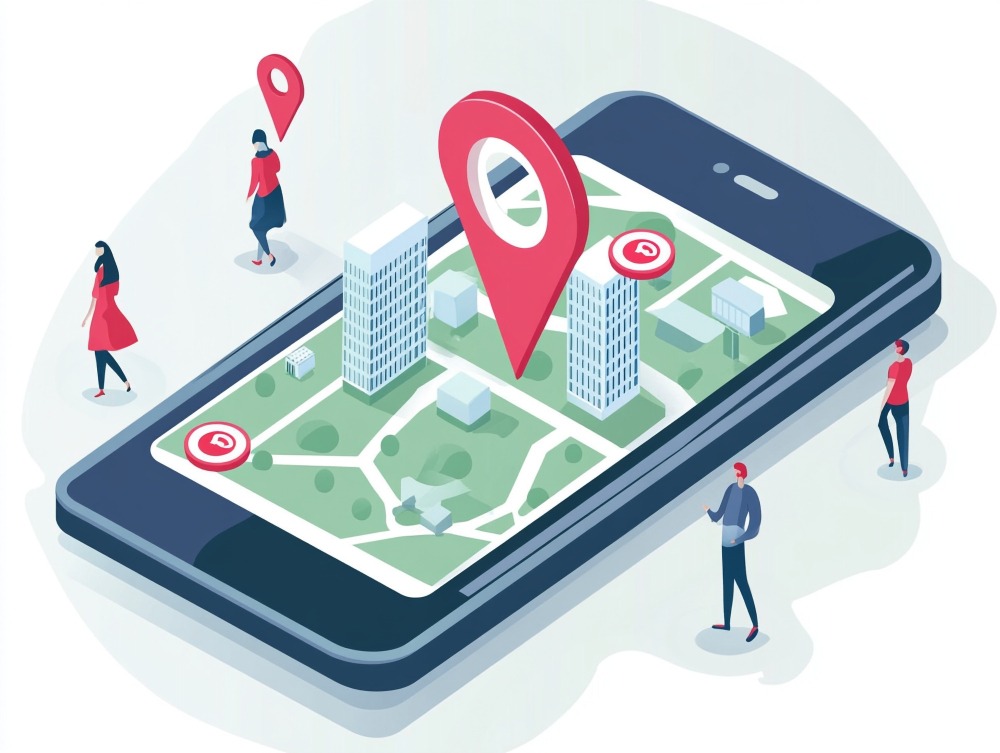
Geofencing allows you to draw a virtual perimeter around a real-world location. When a mobile device enters this zone, it triggers an ad display on apps the user is browsing (like Weather, News, or Social apps). You can also send them a WhatsApp message.
Targeting Your Own Store
You can retarget customers who visited your location but left without buying.
The Message: "Thanks for visiting! Did you see something you liked? Come back this week for 10% off."
Targeting Competitors (Conquesting)
This is an aggressive but effective tactic. You can place a geofence around your competitors’ locations.
Scenario: A customer is walking through a competitor's big-box store. They check their phone to compare prices.
Your Message Appears: "Don't overpay. We have the same model in stock for $20 less. We are just 5 minutes away."
This strategy works best for high-frequency categories like QSR (Quick Service Restaurants), apparel, and home goods, where the barrier to switching locations is low.
Strategy 6: Turning Returns into Revenue
Returns are often viewed as a "necessary evil" of retail, costing e-commerce merchants billions annually. Online return rates often hover between 20% and 30%, compared to just 8-10% for brick-and-mortar.
However, an omnichannel retailer views a return as a traffic opportunity. This is where BORIS (Buy Online, Return In-Store) comes in.
The Operational Upsell
When a customer initiates a return online, your system should aggressively promote the in-store option.
Incentive: "Return by mail ($5.99 fee) OR Return in-store for FREE and get a $10 voucher."
Data shows that 66% of shoppers who return an item in-store will make a new purchase during the same visit.
Staff Training is Key:
Your associates should be trained to pivot the interaction from a "refund" to an "exchange."
Script: "I see this shirt didn't fit. We actually just got the new season colors in—let me grab a Medium for you to try on right now so you don't leave empty-handed."
By reducing return shipping costs and converting refunds into exchanges, BORIS becomes a profit center rather than a cost center.
Closing the Loop
The retailers winning in 2025 and beyond aren't thinking in terms of channels; they are thinking in terms of lifecycles.
Part 1 of this series showed you how to capture the data. Part 2 has shown you how to activate it. When you combine these two halves, you create a self-sustaining loop:
A customer buys online → Returns in-store (foot traffic).
While in-store, they buy an upsell →You capture their digital receipt (Data).
That data triggers a replenishment email →They buy again online.
This shift transforms your brick-and-mortar locations from isolated shops into dynamic fulfillment and experience hubs that feed and are fed by your digital ecosystem.
Ready to launch your first omnichannel campaigns to increase your in-store traffic? Book a demo with ZEPIC.
Frequently Asked Questions
How do I track if my online ads are actually driving store visits?
Platforms like Google and Meta offer Store Visits reporting, which uses anonymized location history to estimate how many users clicked an ad and later visited your physical store.
For higher accuracy, use the Offline Conversions API to upload hashed transaction data from your POS back to ad platforms. This allows you to match digital ad engagement with real in-store purchases.
Is WhatsApp marketing intrusive for retail customers?
It can be if misused. To maintain customer trust, only message users who have explicitly opted in, such as through a checkbox at checkout or on your website.
Focus on transactional and helpful messages like receipts, order updates, back-in-stock alerts, or appointment reminders, rather than generic promotional spam.
What is the difference between retargeting and geofencing?
Retargeting (remarketing) targets users based on past online behavior, such as visiting your website or abandoning a cart.
Geofencing targets users based on their real-time physical location, regardless of whether they have interacted with your brand online before.
Can I use email marketing to drive foot traffic if I don’t sell online?
Absolutely. You don’t need an e-commerce site to run effective email marketing.
Use email to promote in-store-only exclusives, VIP shopping events, workshops, or flash sales that require physical attendance. The objective is engagement and store visits, not just clicks.
How does BORIS (Buy Online, Return In-Store) save money?
BORIS eliminates the cost of return shipping labels, which retailers often subsidize.
It also puts returned inventory back on shelves faster, sometimes the same day, instead of sitting in a warehouse for weeks. This reduces markdown risk and improves inventory turnover.
Desperate times call for desperate Google/Chat GPT searches, right? "Best Shopify apps for sales." "How to increase online sales fast." "AI tools for ecommerce growth."
Been there. Done that. Installed way too many apps. But here's what nobody tells you while you're doom-scrolling through Shopify app reviews at 2 AM—that magical online sales-boosting app you're searching for? It doesn't exist. Because if it did, Jeff Bezos would've bought (or built!) it yesterday, and we (fellow eCommerce store owners) would all be retired in Bali by now. Growing a Shopify store and increasing online sales isn’t easy—we get it. While everyone’s out chasing the next “revolutionary” tool/trend (looking at you, DeepSeek), the real revenue drivers are probably hiding in plain sight—right there inside your customer data. After working with Shopify stores like yours (shoutout to Cybele, who recovered almost 25% of their abandoned carts with WhatsApp automation), we’ve cracked the code on what actually moves the needle. Ready to stop app-hopping and start actually growing your sales by using what you already have? Here are four fixes that will get you there!
The Painful Truth: You're probably losing about 70% of your potential sales to cart abandonment. That's not just a statistic—it's real money walking out of your digital door. And looking for yet another Shopify app for abandoned cart recovery isn't going to fix it if you're not getting the fundamentals right.
The Quick Fix: Everyone knows you need multi-channel recovery that hits the sweet spot between "Hey, did you forget something?" and "PLEASE COME BACK!" But here's the reality—most recovery apps are a one-trick pony. They either do email OR WhatsApp, not both. And don't even get us started on personalizing offers based on cart value—that usually means toggling between three different dashboards while praying your apps talk to each other.
Enter ZEPIC: This is where we come in. With ZEPIC's automated Flows, you can: Launch WhatsApp recovery messages (with 95% open rates!) Set up perfectly timed email sequences (or vice versa) Create personalized recovery offers not just on cart value but based on your customer’s behavior/preferences Track and optimize everything from one dashboard
Fix #2: Reactivate past customers today
The Painful Truth: You're probably losing about 70% of your potential sales to cart abandonment. That's not just a statistic—it's real money walking out of your digital door. And looking for yet another Shopify app for abandoned cart recovery isn't going to fix it if you're not getting the fundamentals right.
The Quick Fix: Everyone knows you need multi-channel recovery that hits the sweet spot between "Hey, did you forget something?" and "PLEASE COME BACK!" But here's the reality—most recovery apps are a one-trick pony. They either do email OR WhatsApp, not both. And don't even get us started on personalizing offers based on cart value—that usually means toggling between three different dashboards while praying your apps talk to each other.
Enter ZEPIC: This is where we come in. With ZEPIC's automated Flows, you can: Launch WhatsApp recovery messages (with 95% open rates!) Set up perfectly timed email sequences (or vice versa) Create personalized recovery offers not just on cart value but based on your customer’s behavior/preferences Track and optimize everything from one dashboard
Offering light at the end of the tunnel is Google’s Privacy Sandbox which seeks to ‘create a thriving web ecosystem that is respectful of users and private by default’. Like the name suggests, your Chrome browser will take the role of a ‘privacy sandbox’ that holds all your data (visits, interests, actions etc) disclosing these to other websites and platforms only with your explicit permission. If not yet, we recommend testing your websites, audience relevance and advertising attribution with Chrome’s trial of the Privacy Sandbox.
Top 3 impacts of the third-party cookie phase-out
Who’s impacted
How
What next
Digital advertising and acquisition teams
Lack of cookie data results in drastic fall in website traffic and conversion rate
Review all cookie-based audience acquisition. Sign up for Chrome’s trial of the Privacy Sandbox
Digital Customer Experience
Customers are not served relevant, personalised experiences: on the web, over social channels and communication media
Multiply efforts to collect first-party customer data. Implement a Customer Data Platform
Security, Privacy and Compliance teams
Increased scrutiny from regulators and questions from customers about data storage and usage
Review current cookie and communication consent management, ensure to align with latest privacy regulations


%201.png)