The Ultimate Guide to 2025 Year-in-Review Emails: Examples, Best Practices, & Strategy
Anandhi Moorthy
Senior Content Marketer
December 18, 2025
TLDR
Year-in-review emails work because they tap into nostalgia, personalization, and identity, not discounts.
They are one of the strongest retention levers, especially as CAC continues to rise.
D2C brands already have enough data (purchase history, SKUs, subscriptions) to create meaningful recaps.
Strong year-in-review emails are visual-first, mobile-optimized, and highly shareable.
Avoid shaming low-activity users; blend personal stats with community data instead.
Soft CTAs outperform hard sales: sharing, downloading, or exploring trends works best.
Best send windows are mid-December (virality) or early January (planning mindset).
Brands that master recap storytelling turn customer data into loyalty, advocacy, and repeat revenue.
The end of the year brings a strange feeling of anticipation and slight envy among direct-to-consumer (D2C) marketers. It’s the time of the year when social media feeds fill with colorful, personalized infographics generated by tech giants like Spotify and Strava. This "Spotify Envy" is real. We watch these recap campaigns dominate conversations, generating millions of organic impressions, and wonder: Can my brand achieve that level of customer love and virality?
A common misconception is that sophisticated data visualizations are only achievable for services like streaming or fitness tracking. Brands selling physical products like coffee, shoes, or skincare often assume, "I sell a tangible item; I don't have enough data for a meaningful recap."
The reality is different: you possess the most valuable data of all, purchase history and brand values. This information, when transformed into a narrative, forms the basis of a powerful marketing tool.
The stakes are higher than ever. As Customer Acquisition Costs (CAC) continue to rise across all platforms, retention is the survival metric for modern businesses. Research indicates that increasing customer retention rates by 5% can increase profits by 25% to 95%. A well-executed year-in-review Email is the ultimate soft-touch retention play. It builds profound customer loyalty and affinity by celebrating the customer's journey, all without explicitly asking for a sale.
This guide will explore how to craft an impactful year-in-review email strategy and help you capitalize on this critical end-of-year marketing moment.
Why Year-in-Review Emails Are Retention Gold (The Psychology)
Year-in-review emails are an essential component of a successful end-of-year email campaign. They work because they tap into fundamental human psychology in ways a standard sales email cannot.
The Power of Nostalgia
Humans are predisposed to find comfort and connection in looking back. Year-in-review emails capitalize on the power of nostalgia by framing the past year as a shared success story between the customer and the brand. Reminding users of their initial purchase, their favorite product, or a milestone reached with your product fosters a deeper, more emotional connection. This psychological bonding helps move the brand relationship from transactional to relational.
The "Ego" Bait (Deep Personalization)
The core reason these emails are so effective is that they are deeply personal. Unlike promotional emails focused on what the brand is selling, the recap is about the customer and their achievements.
People inherently love reading about themselves. When a year-in-review email tells a customer, "You bought 12 bags of coffee this year," it’s a validation of their routine and preference. This hyper-personalization makes the customer feel seen and valued as an individual, not just another line item in a quarterly report.
Social Proof & Virality
The inherent structure of these recaps—colorful visuals summarizing a customer’s year—makes them highly shareable. When a user sees their personalized card, whether it’s their listening stats or total number of orders, they’d want to share it with the world. Instinctively, they post on social media. This public declaration functions as powerful, organic social proof.
The customer becomes an enthusiastic brand ambassador, generating millions of dollars in free marketing for companies like Spotify.
Re-engagement of Dormant Users
Year-in-review emails are often a powerful wake-up call for users who have become dormant or less active. The email reminds them of the value, utility, or pleasure they previously derived from the product or service. Seeing their past engagement, even a small amount, can trigger a desire to re-engage. For instance, a customer who hasn't bought coffee in six months might see their consumption stats and realize, "I really loved that blend," prompting them to place a new order.
The 4 Strategies for D2C Year-End Recaps (Solving the "Data Gap")
D2C brands selling physical goods can create compelling year-in-review emails even without the complex behavioral data of an app-based service. The secret lies in creatively transforming purchase history into a meaningful customer story.
Strategy A: The "Power User" Profile (For High-Frequency CPG)
Best for: Coffee, Supplements, Pet Food, Meal Kits, Diapers.
This strategy focuses on quantifying the customer’s habits and how the product integrates into their daily life. The goal is to reinforce the routine and celebrate consistency.
The Data Narrative: Convert weight/units into an experiential metric. Instead of "You bought 10 kg of coffee," calculate: "You powered 180 mornings with our single-origin blends."
The Identity Hook: Profile their preferences. If a customer only bought French Vanilla, their headline is "You're a True Vanilla Devotee."
Retention Example: Calculate the benefit derived from their loyalty. "Because you are subscribed, you saved a total of $75 on pet food this year." Data from the subscription industry shows that highlighting savings boosts perceived value and increases the likelihood of subscription renewal by approximately 20%.
Strategy B: The "Tastemaker" Profile (For Fashion/Home Goods)
Best for: Apparel, Jewelry, Decor, Accessories.
This approach uses purchase data to flatter the customer, positioning them as an influential buyer and a trendsetter.
The Data Narrative: Look at the product colors and silhouettes purchased. "Your 2025 color palette was dominated by Sage Green and Terracotta" (based on SKU data).
The Identity Hook: Assign a high-status rank. "You purchased the Winter Drop within 24 hours of launch, congratulations, you're a Top 1% Trend Setter." This segmentation can be based on buying speed or total lifetime spend.
Retention Example: Give them early access or a special discount for being a "tastemaker" in the new year. This reinforces their VIP status and drives future purchase intent.
Strategy C: The "Impact" Profile (For Mission-Driven Brands)
Best for: Sustainable Goods, Ethical Fashion, Brands with Charitable Give-Back.
This is a powerful strategy for brands where the value proposition extends beyond the product itself. It uses the customer’s purchase power to tell a story of shared impact.
The Data Narrative: Instead of "You bought 5 pairs of socks," quantify it as "Together, your purchases diverted 15 pounds of plastic from landfills" or "Your support helped provide 4 days of work for our partner artisan co-op."
The Identity Hook: Shared Values. "We Did Good, Together." This aligns the customer's personal identity with the brand's mission, creating an unbreakable bond.
Small Business "Community" Recap (The Low-Data Fallback)
If individual-level data is too difficult or sparse, a community-focused recap is a perfect alternative for you. This strategy leverages the power of social proof and the "bandwagon effect."
Why It Works: Customers love to feel like they belong to a successful, growing community. The brand says, "We may not have your individual statistics, but our incredible community achieved this together."
The Data Narrative: Aggregate the entire year's sales. "This year, our community bought 5,000 handmade candles, which means we sent 100,000 hours of comfort and light around the world."
The Identity Hook: Focus on "Most Popular." A "Top 10 Most Popular Products of 2025" list drives traffic and sales by suggesting social consensus.
7 Best Practices for Crafting the Perfect Year-in-Review Email
1. Data Accuracy: A spectacular design cannot save an email with incorrect data. A bad data experience is worse than no data at all; it can be insulting to the user. Imagine a ride-share app sending an email saying, "You took 0 rides," to a frequent customer. That’s why you need to make sure the data you attach is accurate.
2. Visual Storytelling is Non-Negotiable: A Year-in-Review Email is not a text memo; it is an infographic. Avoid dense walls of text. Use bold, contrasting colors, dynamic charts, and custom icons to represent data points. Visualizing metrics instantly reduces cognitive load and makes the information more engaging.
Consider using animated GIFs or small video clips to bring the data to life. This is where your design team’s expertise must shine.
3. Handle the Comparison Trap Gracefully: Not all customers are "Power Users." You must navigate the "Comparison Trap" carefully. Never shame or ignore customers with "low" numbers.
Do not use metrics that imply failure. Instead of "You missed 5 deadlines," focus on "You completed 50 tasks."
Focus on what they did do, no matter how small. For a user who made one purchase, the message should be: "Thank you for starting your journey with us! Your single purchase of the Ultra-Comfort Throw became one of our Top 10 Bestsellers this year."
Use community stats as a buffer. Blend individual stats with the broader community recap to ensure every user feels part of the overall success story.
4. Mobile Optimization is Crucial: The viral success of a Year-in-Review Email often happens when users share their personalized card on Instagram Stories or TikTok. This means the vast majority of recipients will open and consume the email on a mobile device.
Design for Thumbnails: Ensure the most vital stat is visible within the first two scrolls.
Use High-Contrast Text: Text should be easily readable over complex background images.
Prioritize Shareability: The button to download or share the personalized graphic must be large, clear, and highly visible on a small screen.
5. The Call-to-Action (CTA) Must Be Soft: The primary goal of the Year-in-Review Email is retention and loyalty, not hard sales. The Call-to-Action (CTA) should reflect this soft-touch approach.
Primary CTA: "Share Your 2025 Recap," "Download Your Personalized Infographic," or "View Your Full Report."
Secondary, Soft CTA: "Explore the Top Products of 2025" or "See What's Trending in the New Year."
6. Timing is Everything: Marketers debate the perfect send time: mid-December or early January.
Mid-December (The Viral Slot): Sending recaps between December 15th and 24th capitalizes on peak social sharing activity, as people are in reflection mode and looking for engaging content. This is the optimal time for virality.
Early January (The Planning Slot): Sending in the first week of January aligns with New Year's resolutions and planning. This slot is better if your primary CTA is focused on goal-setting for the year ahead (e.g., "See how much you can save in 2026").
7. Subject Lines that Click: The subject line is the gatekeeper to your incredible creative work. They must leverage curiosity and personalization. The best-performing subject lines often fall into two categories: a direct call to action or one that hints at valuable, personal data.
Examples of High-Converting Subject Lines:
🎉 Your 2025 In Review: Look How Much You Accomplished!
[First Name], see your year with [Brand Name].
The Official Recap: Your Top 3 Styles of 2025 Are Inside!
Did you know you saved $105 this year? Your 2025 Report.
Our Community’s Top Moments (and Your Favorite Purchase).
See the Impact: The good you did with [Brand Name] in 2025.
How to Create a Year-in-Review Campaign (Step-by-Step)
Step 1: Data Collection & Metric Identification
The initial and most crucial step is to identify what metrics you can realistically track and pull into an email.
Purchase History: Total orders, total items, most common SKU/flavor, total money spent, savings from subscription.
Behavioral Data (If applicable): Total time in app, most common feature used, content consumed (if a content-driven D2C brand).
Impact Data: Total amount of recycled material, trees planted, or charitable donations linked to the customer’s ID.
Step 2: Segmentation for Relevance
Sending a deep dive to a customer who only signed up last week is irrelevant and awkward. You must segment your audience.
Create a Segment: Filter for "Active Users > 3-6 Months." This ensures you are only sending the recap to users with a statistically significant and meaningful history.
Create a Fallback Segment: For newer users, send a simple, forward-looking welcome message or the "Community Recap" to ensure they still feel included.
Step 3: The Template Build and Dynamic Tags
Your email service provider (ESP) must be leveraged to pull personalized data points.
Use Dynamic Tags: Implement Liquid or Merge Tags (e.g., {{customer.total_purchases}}, {{customer.favorite_color}}) within your email template. This is what transforms a generic email into a personalized review card.
Design the Visual Shell: Create the aesthetic template first, leaving clear placeholders for where the personalized statistics will be dropped in.
Step 4: The QA Process and Edge Cases
Test Null Values: What happens if a customer has 0 for a key metric? The template should be designed to substitute a community stat or a soft message ("We look forward to powering your journey in 2026!") rather than displaying a jarring "0" or a blank space.
A/B Test Subject Lines: Always test 2–3 subject lines to maximize the open rate before the full deployment.
3 Year-in-Review Email Examples (And Why They Worked)
Example 1: Chewy (The Emotional Hook)
The Strategy: Chewy, the online pet supply retailer, leverages the deep emotional bond between a pet owner and their animal. They frame the recap not around dog food sales, but around the pet's journey.
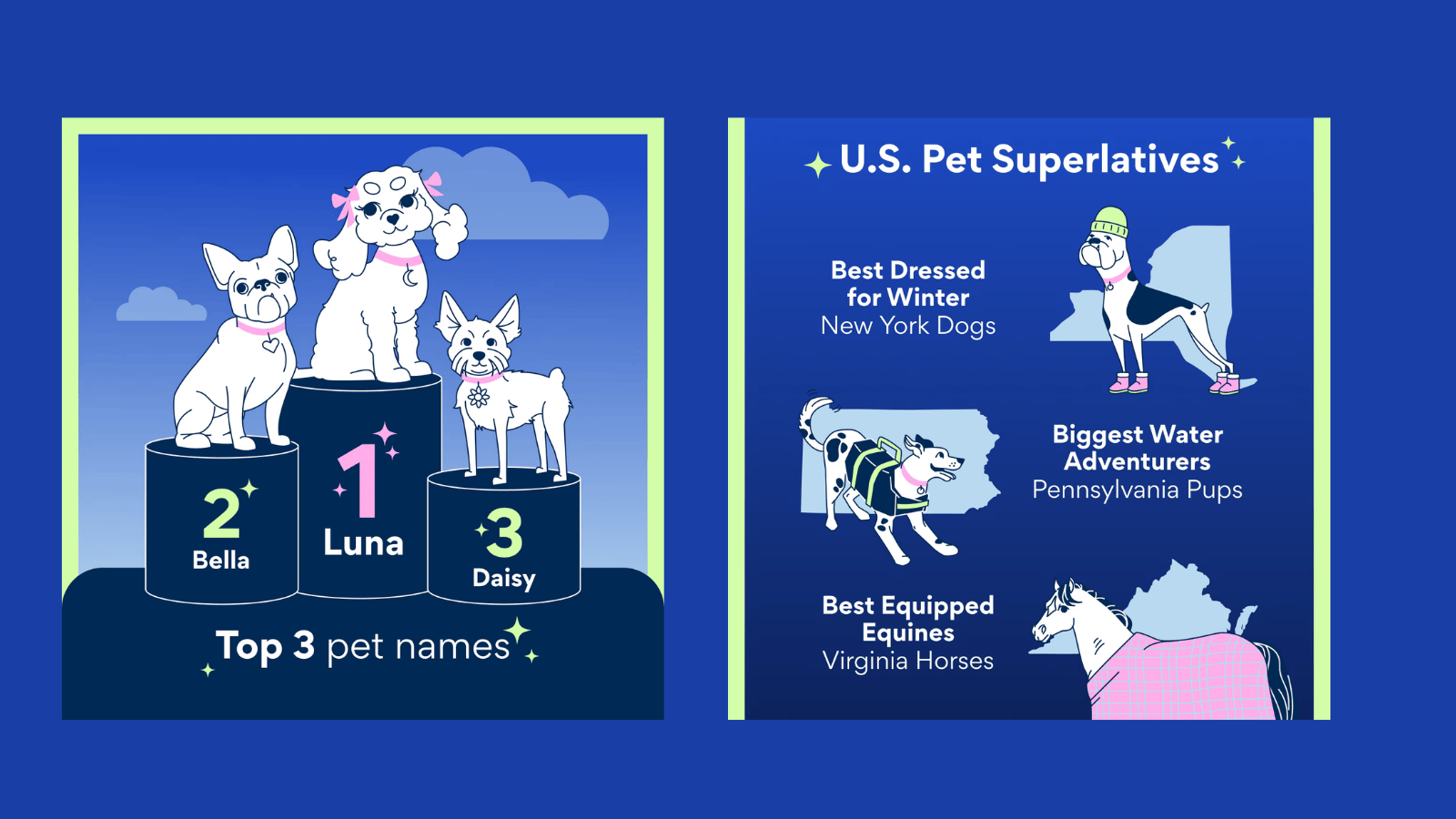
Why it Worked: They use profile data to address the email to the pet's name, e.g., "A Year in the Life of Buddy." Data points included total food weight, number of toys bought, and even humorous categories like "Most Common Treat." This shifts the focus from a transaction to a celebration of the customer's identity as a loving pet owner. The use of a pet's name increases emotional resonance and open rates dramatically.
Example 2: Spotify Wrapped
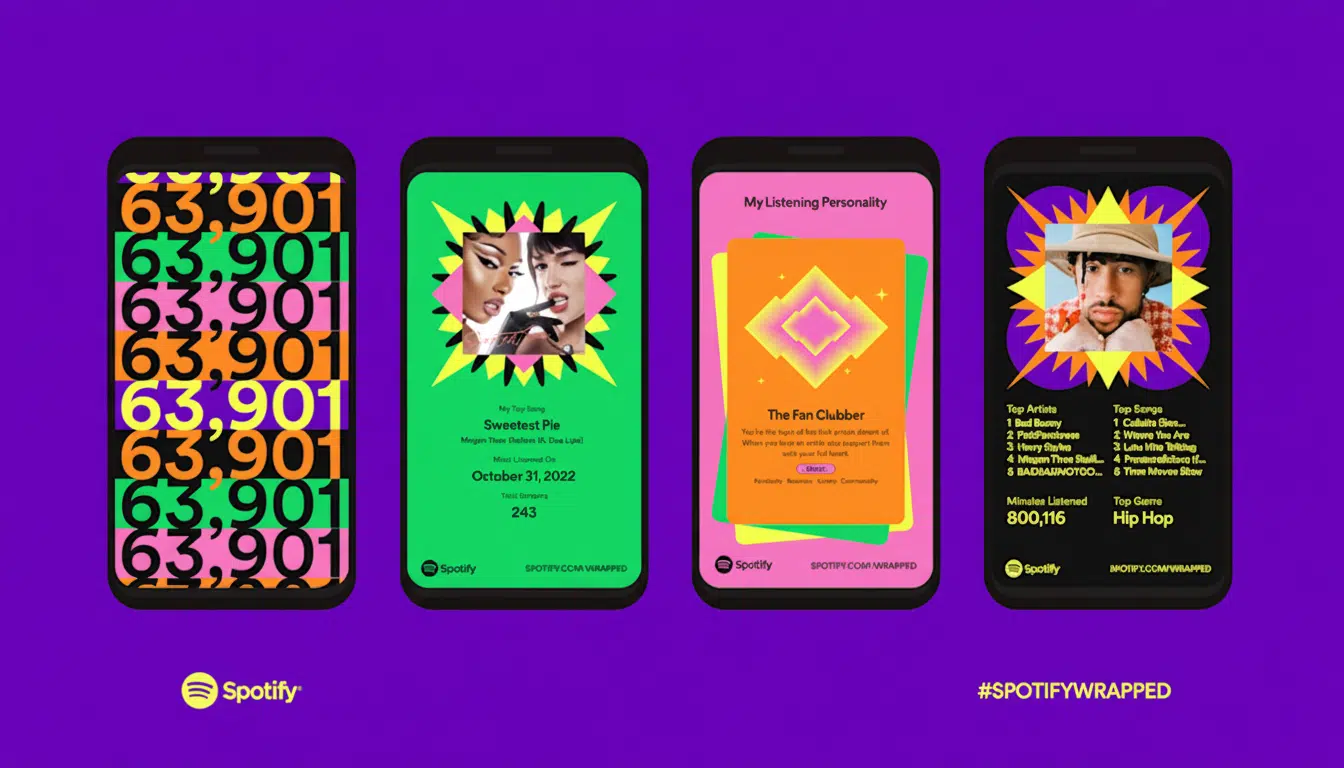
The Strategy: Spotify’s success is built on packaging personalized data into easy-to-digest, highly aesthetic, and supremely shareable "cards." They don't just report listening time; they translate it into a personality.
Why It Worked: The introduction of the "Listening Personality"—assigning users titles like "The Time Traveler" or "The Alchemist" based on their listening habits—elevates simple data into a fun, public identity statement.
The vibrant, mobile-optimized design and single-tap share function guarantee virality.
Example 3: Grammarly
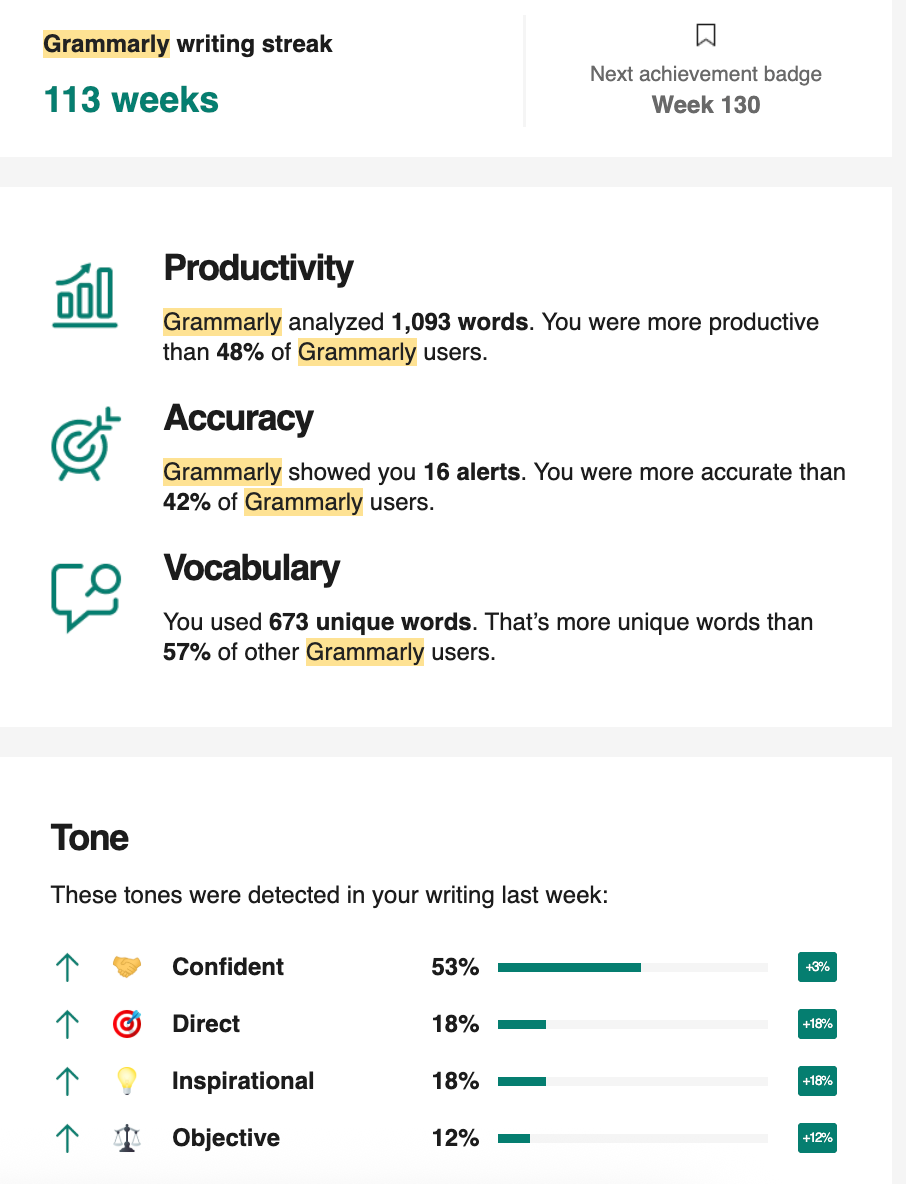
The Strategy: For a utility service focused on correcting errors, Grammarly needed to reframe their data to focus on achievement and productivity, not mistakes.
Why it Worked: They focus on the positive outcome. Stats include "Total Words Checked," "Unique Vocabulary Used," and "Total Productive Hours Saved." Framing the corrections as a boost to confidence rather than a record of errors corrected fosters a powerful sense of accomplishment in the user.
Wrapping Up
The Year-in-Review Email is a fundamental relationship-building tool. Its value lies in its ability to humanize your brand and celebrate the customer's journey. In an era where customer retention is the leading indicator of long-term profitability, these personalized recaps serve as the ultimate soft-touch strategy.
Start small. If you cannot yet execute complex, individual data visualizations, begin with the simple but effective "Top 10 Products of the Year" or the "Impact" profile. The goal is simply to acknowledge the milestone and thank your customers for their support. The brands that win in 2026 will be the ones that master data storytelling.
Ready to leverage your complete customer data for hyper-personalized campaigns? Book a ZEPIC demo and see how our Marketing OS unifies your data and transforms it into 1:1 customer engagement at scale.
Desperate times call for desperate Google/Chat GPT searches, right? "Best Shopify apps for sales." "How to increase online sales fast." "AI tools for ecommerce growth."
Been there. Done that. Installed way too many apps. But here's what nobody tells you while you're doom-scrolling through Shopify app reviews at 2 AM—that magical online sales-boosting app you're searching for? It doesn't exist. Because if it did, Jeff Bezos would've bought (or built!) it yesterday, and we (fellow eCommerce store owners) would all be retired in Bali by now. Growing a Shopify store and increasing online sales isn’t easy—we get it. While everyone’s out chasing the next “revolutionary” tool/trend (looking at you, DeepSeek), the real revenue drivers are probably hiding in plain sight—right there inside your customer data. After working with Shopify stores like yours (shoutout to Cybele, who recovered almost 25% of their abandoned carts with WhatsApp automation), we’ve cracked the code on what actually moves the needle. Ready to stop app-hopping and start actually growing your sales by using what you already have? Here are four fixes that will get you there!
The Painful Truth: You're probably losing about 70% of your potential sales to cart abandonment. That's not just a statistic—it's real money walking out of your digital door. And looking for yet another Shopify app for abandoned cart recovery isn't going to fix it if you're not getting the fundamentals right.
The Quick Fix: Everyone knows you need multi-channel recovery that hits the sweet spot between "Hey, did you forget something?" and "PLEASE COME BACK!" But here's the reality—most recovery apps are a one-trick pony. They either do email OR WhatsApp, not both. And don't even get us started on personalizing offers based on cart value—that usually means toggling between three different dashboards while praying your apps talk to each other.
Enter ZEPIC: This is where we come in. With ZEPIC's automated Flows, you can: Launch WhatsApp recovery messages (with 95% open rates!) Set up perfectly timed email sequences (or vice versa) Create personalized recovery offers not just on cart value but based on your customer’s behavior/preferences Track and optimize everything from one dashboard
Fix #2: Reactivate past customers today
The Painful Truth: You're probably losing about 70% of your potential sales to cart abandonment. That's not just a statistic—it's real money walking out of your digital door. And looking for yet another Shopify app for abandoned cart recovery isn't going to fix it if you're not getting the fundamentals right.
The Quick Fix: Everyone knows you need multi-channel recovery that hits the sweet spot between "Hey, did you forget something?" and "PLEASE COME BACK!" But here's the reality—most recovery apps are a one-trick pony. They either do email OR WhatsApp, not both. And don't even get us started on personalizing offers based on cart value—that usually means toggling between three different dashboards while praying your apps talk to each other.
Enter ZEPIC: This is where we come in. With ZEPIC's automated Flows, you can: Launch WhatsApp recovery messages (with 95% open rates!) Set up perfectly timed email sequences (or vice versa) Create personalized recovery offers not just on cart value but based on your customer’s behavior/preferences Track and optimize everything from one dashboard
Offering light at the end of the tunnel is Google’s Privacy Sandbox which seeks to ‘create a thriving web ecosystem that is respectful of users and private by default’. Like the name suggests, your Chrome browser will take the role of a ‘privacy sandbox’ that holds all your data (visits, interests, actions etc) disclosing these to other websites and platforms only with your explicit permission. If not yet, we recommend testing your websites, audience relevance and advertising attribution with Chrome’s trial of the Privacy Sandbox.
Top 3 impacts of the third-party cookie phase-out
Who’s impacted
How
What next
Digital advertising and acquisition teams
Lack of cookie data results in drastic fall in website traffic and conversion rate
Review all cookie-based audience acquisition. Sign up for Chrome’s trial of the Privacy Sandbox
Digital Customer Experience
Customers are not served relevant, personalised experiences: on the web, over social channels and communication media
Multiply efforts to collect first-party customer data. Implement a Customer Data Platform
Security, Privacy and Compliance teams
Increased scrutiny from regulators and questions from customers about data storage and usage
Review current cookie and communication consent management, ensure to align with latest privacy regulations


%201.png)